
 SEOWordPress plugin · Free
Indigothorn Internal Links
Internal link suggestions from your own words, while you write. Free.
What paid tools like Link Whisper do, for free: it reads your posts and suggests where to link.
Specification
- Price
- Free, GPL
- Version
- 0.1.0
- Requires
- WordPress 6.5+, PHP 8.1+
- Tested up to
- WordPress 7.1
- Instead of
- Link Whisper (paid)
- AI
- Not used
- Key number
- ~70 ms suggestions on 10,000 posts
See the idea work, right here.
A small working preview of what the plugin does, on sample data, in your browser. Nothing is sent anywhere.
Your draft (edit it)
Preview · click a highlighted phrase
Before your first race, build a simple marathon training plan and keep most runs at an easy pace. On muddy paths, trail running shoes give you grip that road shoes cannot. Plan your recovery after long runs as carefully as the runs themselves, and add strength training twice a week.
Suggested links from this site
The plugin indexes every post in the background and answers in about 70 ms on a site with 10,000 posts.
Indigothorn Internal Links vs the alternatives.
Measured in our lab with the same data where there is a number; features from each plugin’s own page otherwise.
| Feature | Indigothorn Internal LinksIndigothorn · free | Link Whisperpaid, ~$97/year | Internal Link Juicerfree, 90k |
|---|---|---|---|
| Suggestions from your text, no keyword setup | Yes | Yes | No |
| Anchor text picked from your sentence | Yes | Yes | No |
| Insert a link in one click | Yes | Yes | Partly |
| Orphaned posts report with linking sources | Yes | Yes | — |
| Price | Free | Paid | Free + Pro |
On 10,004 posts, suggestions in the editor take 69 ms (median) with 9 database queries. “—” means not applicable or not checked.
The free plugin is complete. Pro adds the heavy lifting.
Proposed price, not on sale yet: from $49 / year. $49 / year for 1 site · $99 for 5 sites · $199 for 25 sites.
- Semantic suggestions that understand meaning, not just words
- Bulk linking across the whole site, with a preview
- Weekly link report by email
What you get.
What it does
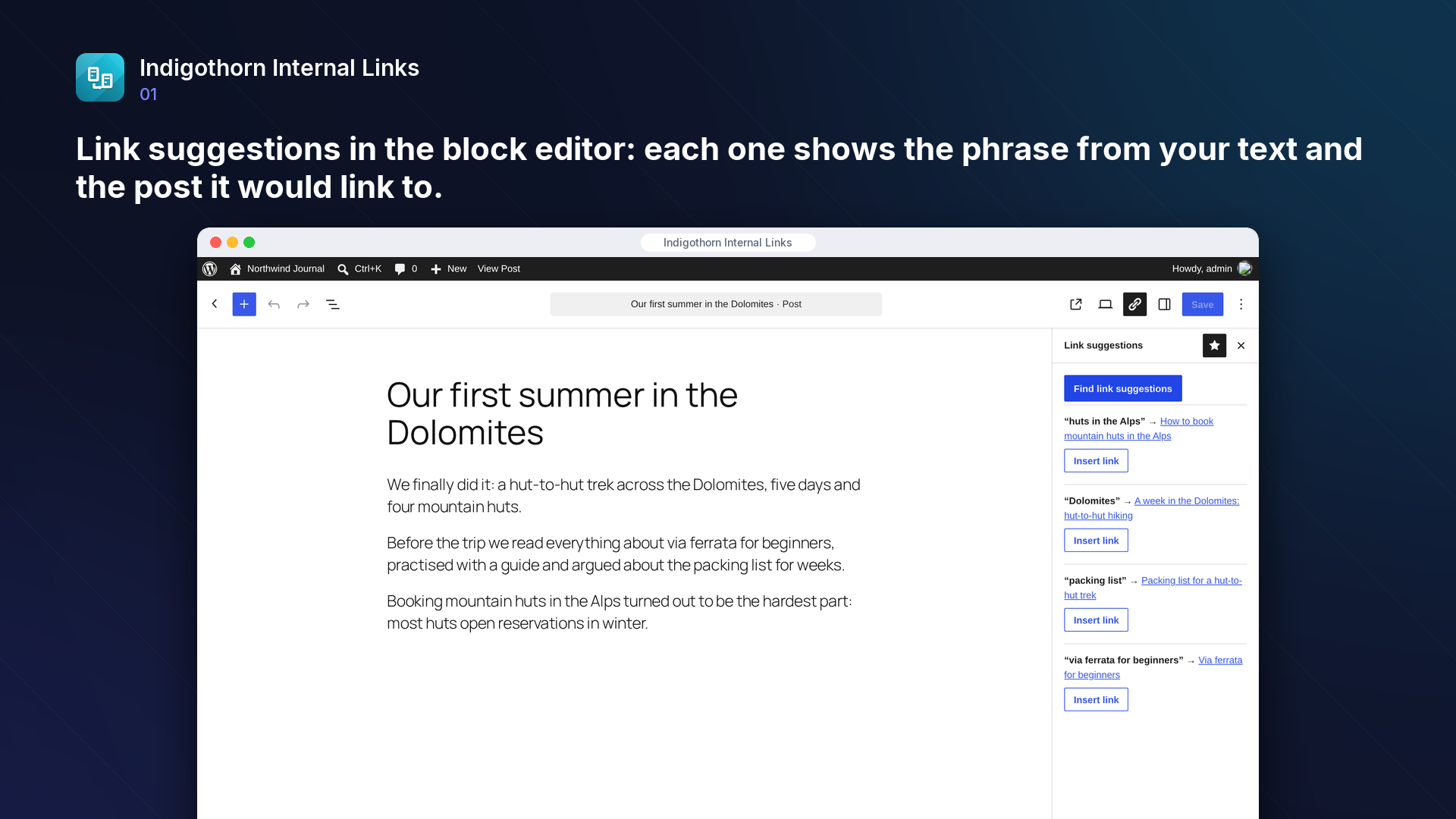
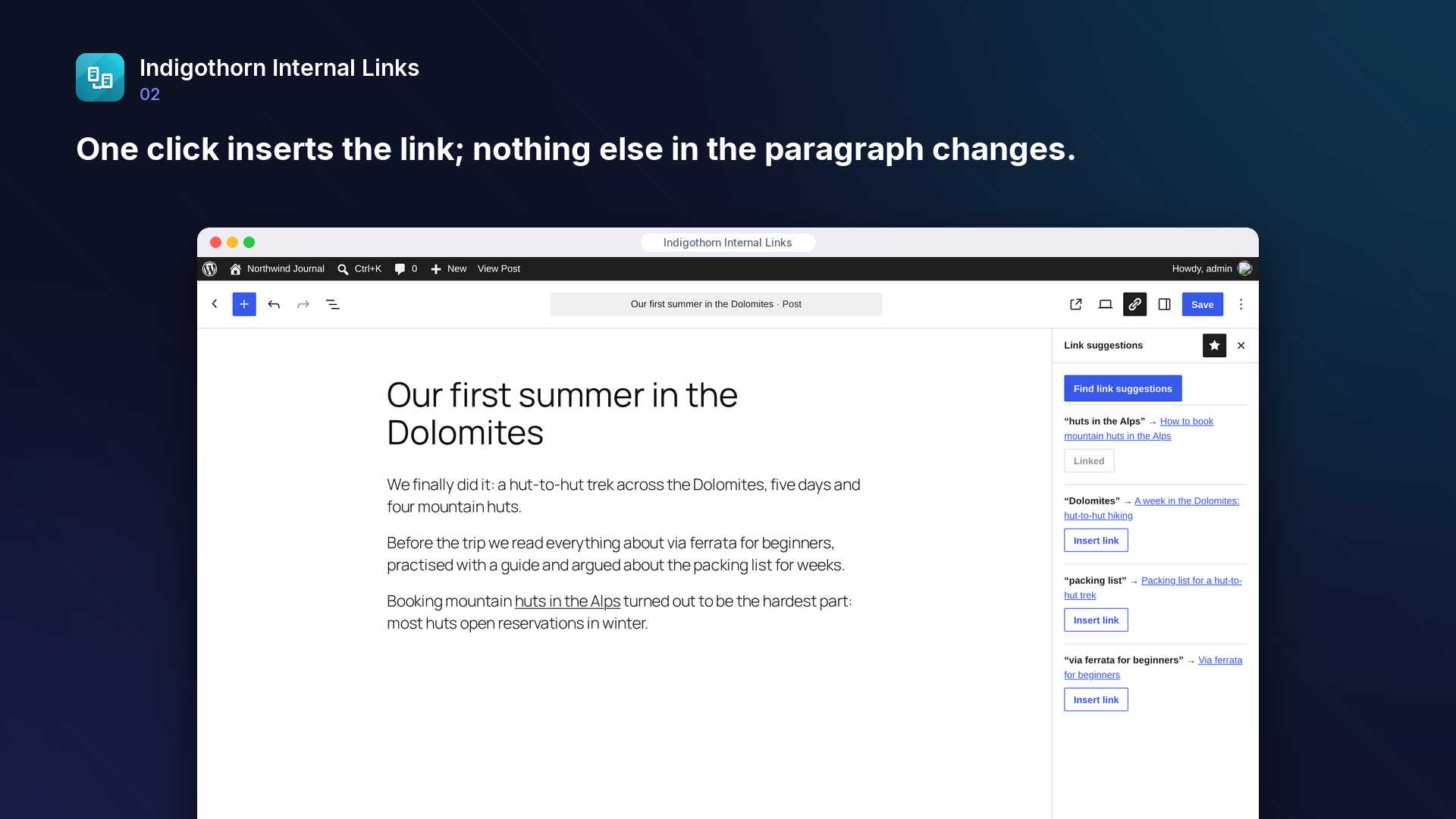
Internal links help readers and search engines find your best content, but adding them by hand is tedious. Indigothorn Internal Links reads your posts and, while you edit, suggests which other posts to link to and which phrase already in your text to use as the link. One click inserts the link; your sentences are never rewritten.
- Link suggestions panel in the block editor, working on unsaved changes too.
- Anchor text from your own words: only phrases that appear in your text and match the title of the target post.
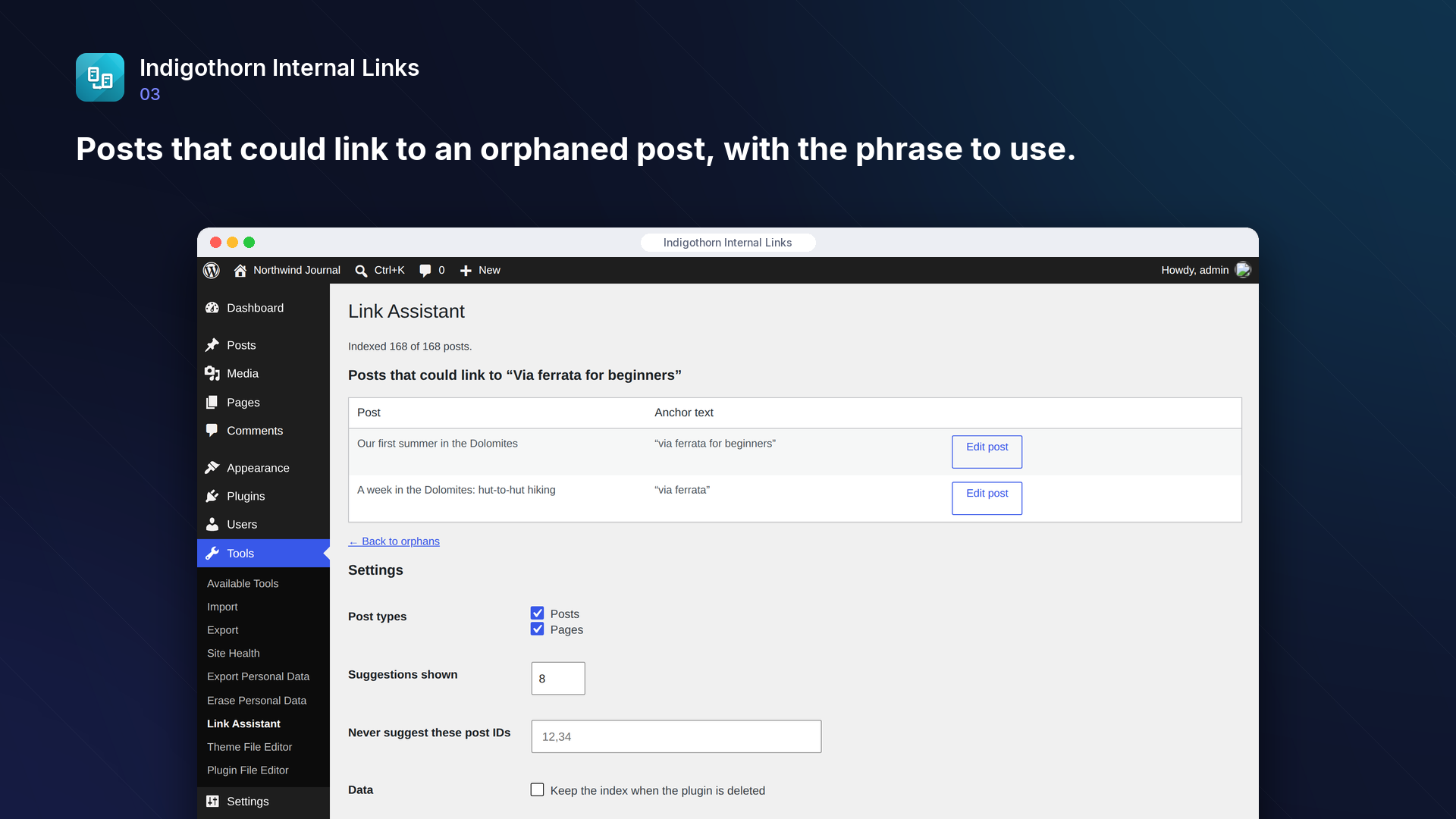
- Orphaned posts report (Tools → Link Assistant): posts no other post links to, and for each one the posts that could link to it, with the phrase to use.
- Classic editor: the same suggestions in a "Link suggestions" box next to the editor, with Insert link and Dismiss, in the Visual and Text tabs.
- Link counts: inbound and outbound internal links for every post, with a summary (posts without inbound links, posts that link nowhere), search and sorting. Also
wp indigothorn-internal-links counts. - Dismiss a suggestion you do not want: that post is never proposed for that link again, in the editor or the report, until you restore it.
- Insert links from the report: tick the posts that should link to an orphan, check the before/after preview and insert all links at once, without opening each post. Every change is saved as a revision.
- Works out of the box: no keywords to configure, no AI service, nothing leaves your site.
- WP-CLI:
wp indigothorn-internal-links index,wp indigothorn-internal-links orphans.
Why this one
Most free internal-linking plugins make you type keywords by hand and then link them automatically everywhere. Paid tools such as Link Whisper read your content instead. Indigothorn Internal Links does that for free: it reads your posts, suggests where to link, and lets you decide.
- Relevant: in our tests every suggestion pointed to a post on the same topic (477 suggestions on an English site, 145 on a site mixing Polish, English and German).
- Natural anchors: a single word is only used when it is one of the distinctive words of the target title, so you will not get links on words like "first" or "guide".
- Fast on big sites: with 10,000 posts, suggestions appear in about 70 ms; the index is built in the background (about 6 ms per post).
Inside WordPress.
How we checked it.
Automated on every release in an offline lab. The numbers are copied from the latest runs.
automated tests: 35 unit and integration, 15 in a real browser
full regression on WordPress 7.1, 6.5 and multisite (2026-10-15)
Plugin Check errors and warnings, including experimental checks
issues found by independent code reviews and fixed, each with a regression test
automated WCAG 2.1 A/AA check of every screen, no serious issues
PHP versions in static analysis and coding standards, both clean
Performance10,003 published posts
- index 10004 posts: 63.8 s (6.4 ms/post), peak memory 121 MB
- editor suggestions on 10004 posts: median 69 ms, p95 86 ms, 9 queries
- orphaned posts report (1372 orphans): 43 ms
- posts that could link to one post: 84 ms
No AI. Nothing leaves your site.
How it works
A local relevance index (BM25) finds posts worth linking and the words to link from.
AI
Not used. Everything runs on your server.
What leaves your site
Nothing. The plugin makes no outside requests.
Common questions.
Does it add links automatically?
No. You choose every link. The plugin only suggests and, when you click "Insert link", wraps the suggested phrase in a link.
Can I add links without opening every post?
Yes. In Tools → Link Assistant, open "Find posts that could link here" for an orphaned post, tick the posts you want, click "Preview selected links" and check the before/after text, then "Insert links". Only the highlighted phrase becomes a link and each post gets a new revision, so you can undo it from the post's revisions. A post that was edited after the preview, or that already links to the target, is skipped.
Does it work with the classic editor?
Yes. Posts edited with the classic editor get a "Link suggestions" box in the sidebar of the edit screen. It works in both the Visual and the Text tab; shortcodes, existing links and HTML tags are left alone. In the block editor the suggestions stay in the sidebar panel.
How do I see which posts get few internal links?
Open Tools → Link Assistant → Link counts. Every indexed post is listed with the number of other published posts linking to it (inbound) and the number it links to (outbound). Sort by inbound to find weakly linked posts, then use "Find posts that could link here". From the command line: wp indigothorn-internal-links counts --orderby=inbound --format=csv.
Can I stop a suggestion from coming back?
Yes. Click "Dismiss" next to a suggestion in the editor panel, or "Do not suggest" in the report. The decision is stored with the post and survives index rebuilds. Dismissed pairs are listed on the report page of the target post, where "Suggest again" restores them.
Does it use AI or external services?
No. Relevance is computed on your server from your own content.
Does it work in my language?
It has been tested with English, Polish and German. Words are compared after a simple normalisation that works for most languages written with letters; languages without spaces between words are not supported yet. On multilingual sites (Polylang, WPML) links are only suggested and inserted between posts of the same language.
Does it see links added by other plugins?
It reads links in the post content. Links that other plugins add only when a page is displayed are not part of the content and are not counted.
Can I run it from the command line?
Yes, with WP-CLI: wp indigothorn-internal-links index builds the index (add --rebuild to start from scratch), wp indigothorn-internal-links orphans lists posts no other post links to and wp indigothorn-internal-links counts exports inbound and outbound link counts. wp help indigothorn-internal-links lists all options.
What happens to my data when I delete the plugin?
The index is removed unless you tick "Keep the index when the plugin is deleted". Links you inserted stay in your posts.
Installation
1. Install and activate the plugin. Your posts are indexed in the background.
2. In the block editor, open "Link suggestions" from the toolbar (link icon) and click "Find link suggestions".
3. See Tools → Link Assistant for orphaned posts and the posts that could link to them.
Works well with.
Indigothorn Table of Contents
A table of contents with zero JavaScript. Your LuckyWP links stay the same.
Indigothorn Related Posts
Related posts that understand your content. YARPP migration in one click.
Indigothorn Link Checker
Find broken links without slowing your site. Fix them in one click.