
 WooCommercePlugin · Free
Indigothorn Review Highlights
What customers say, in their own words. You approve every highlight.
Shoppers don't read 50 reviews. Show the top pros and cons, each backed by a real quote.
Specification
- Price
- Free, GPL
- Version
- 0.1.0
- Requires
- WordPress 6.7+, PHP 8.1+
- Tested up to
- WordPress 7.1
- Instead of
- Reading 50 reviews
- AI
- Optional, your provider
- Key number
- 200 reviews summarised in ~45 ms
See the idea work, right here.
A small working preview of what the plugin does, on sample data, in your browser. Nothing is sent anywhere.
10 approved reviews · 3.6 ★
Draft highlights · you publish them
Every point carries a sentence copied word for word from a review. Without AI, 200 reviews take about 45 ms in the background.
Indigothorn Review Highlights vs the alternatives.
Measured in our lab with the same data where there is a number; features from each plugin’s own page otherwise.
| Feature | Indigothorn Review HighlightsIndigothorn · free | Customer Reviews for WooCommerce80k installs | Review platformsJudge.me, Yotpo |
|---|---|---|---|
| Pros and cons from your reviews | Yes | No | Partly |
| Every claim backed by a word-for-word quote | Yes | No | No |
| You approve before shoppers see it | Yes | — | No |
| Works without AI | Yes | — | No |
| Price | Free | Free + paid | Paid plans |
Summarising 200 reviews without AI takes about 45 ms, in the background. “—” means not applicable or not checked.
The free plugin is complete. Pro adds the heavy lifting.
Proposed price, not on sale yet: $29 / year. $29 / year.
- AI summaries without your own key
- Automatic refresh when reviews arrive
- Summaries in your shop languages
What you get.
What it does
Shoppers rarely read 50 reviews. Indigothorn Review Highlights reads them for them and adds a Customers say section to the product page:
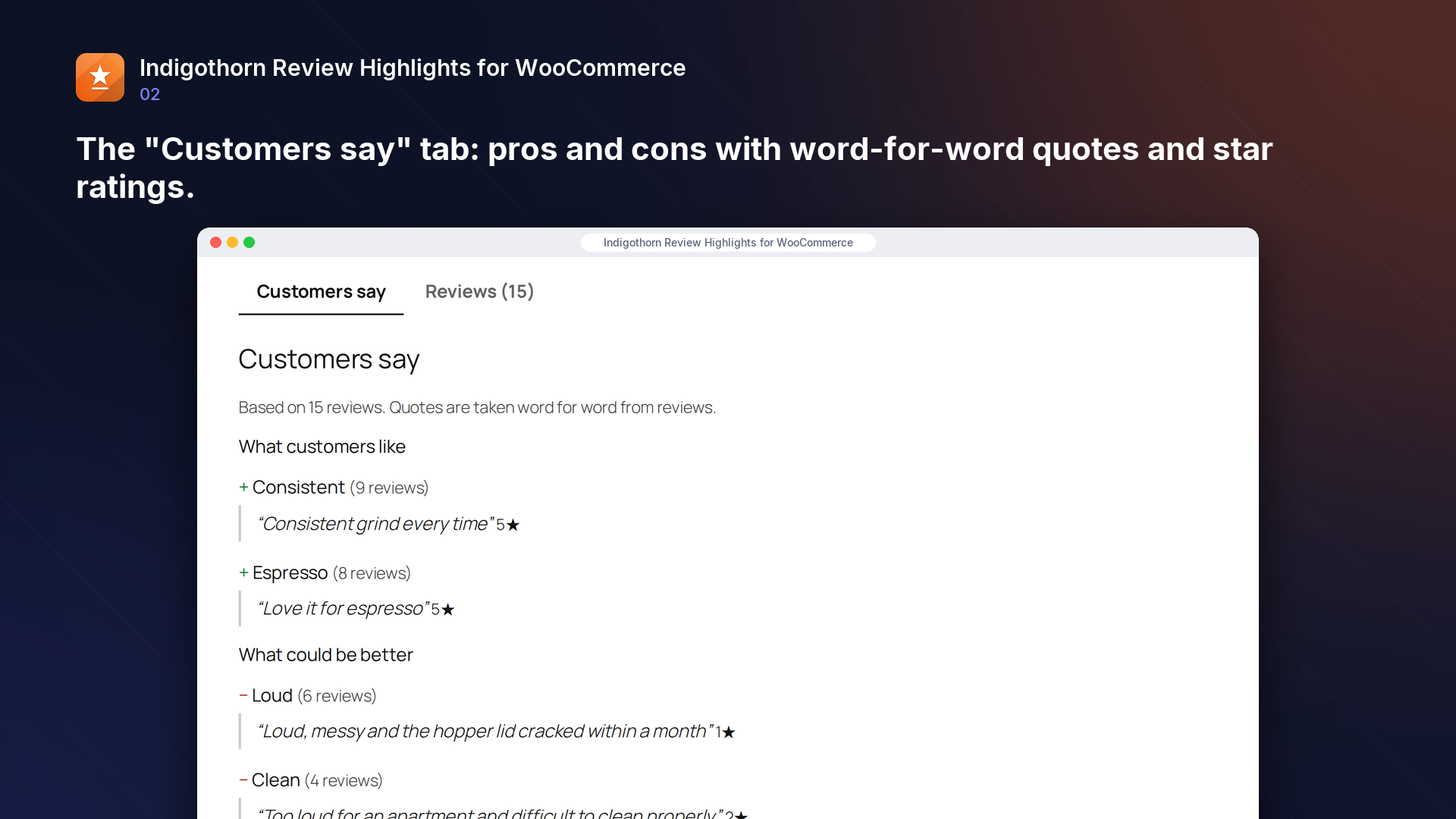
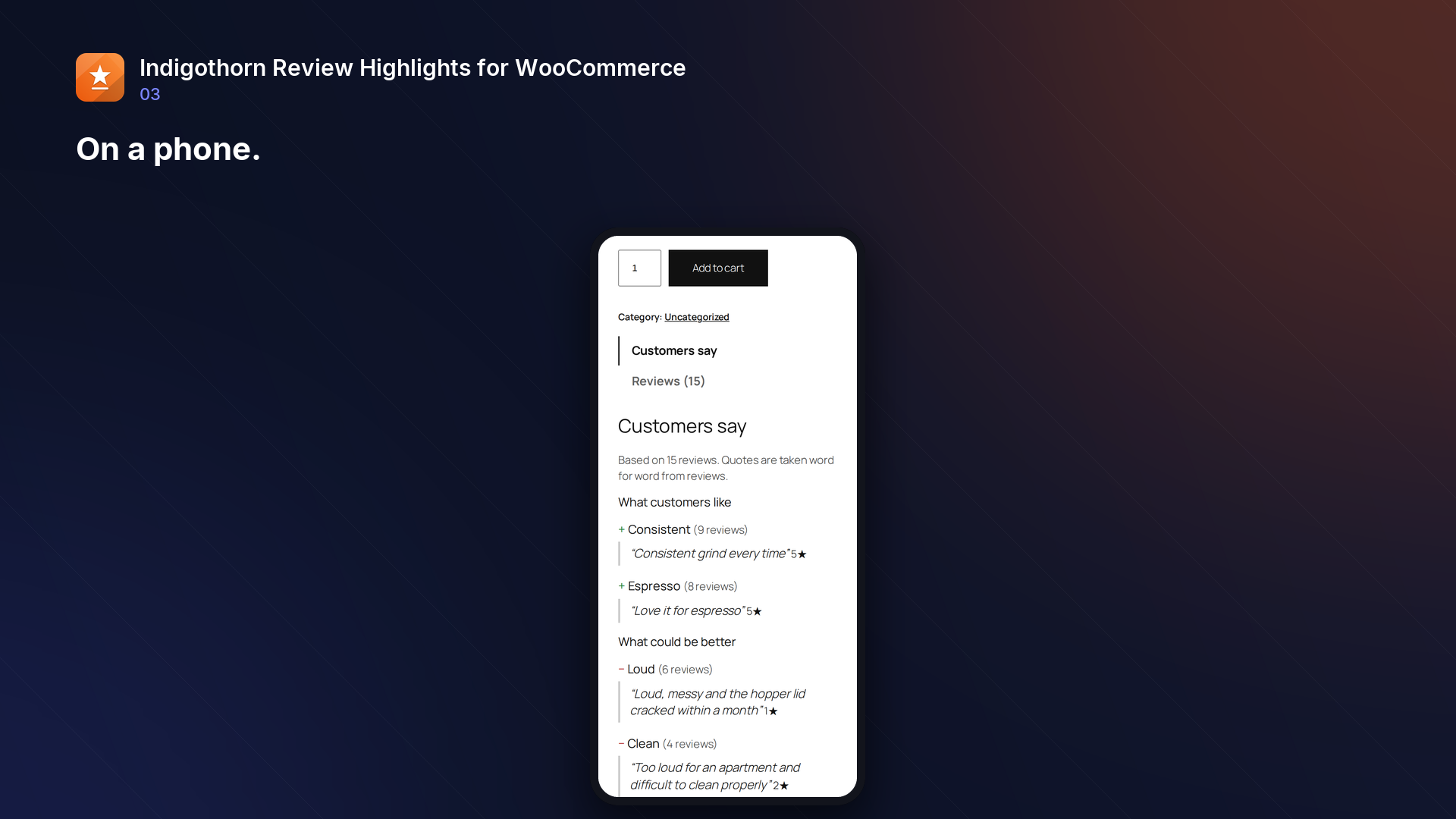
- What customers like and What could be better: the features mentioned most often (battery, fit, grip, noise…), how many reviews mention them, and a quote copied word for word from a review, with its star rating.
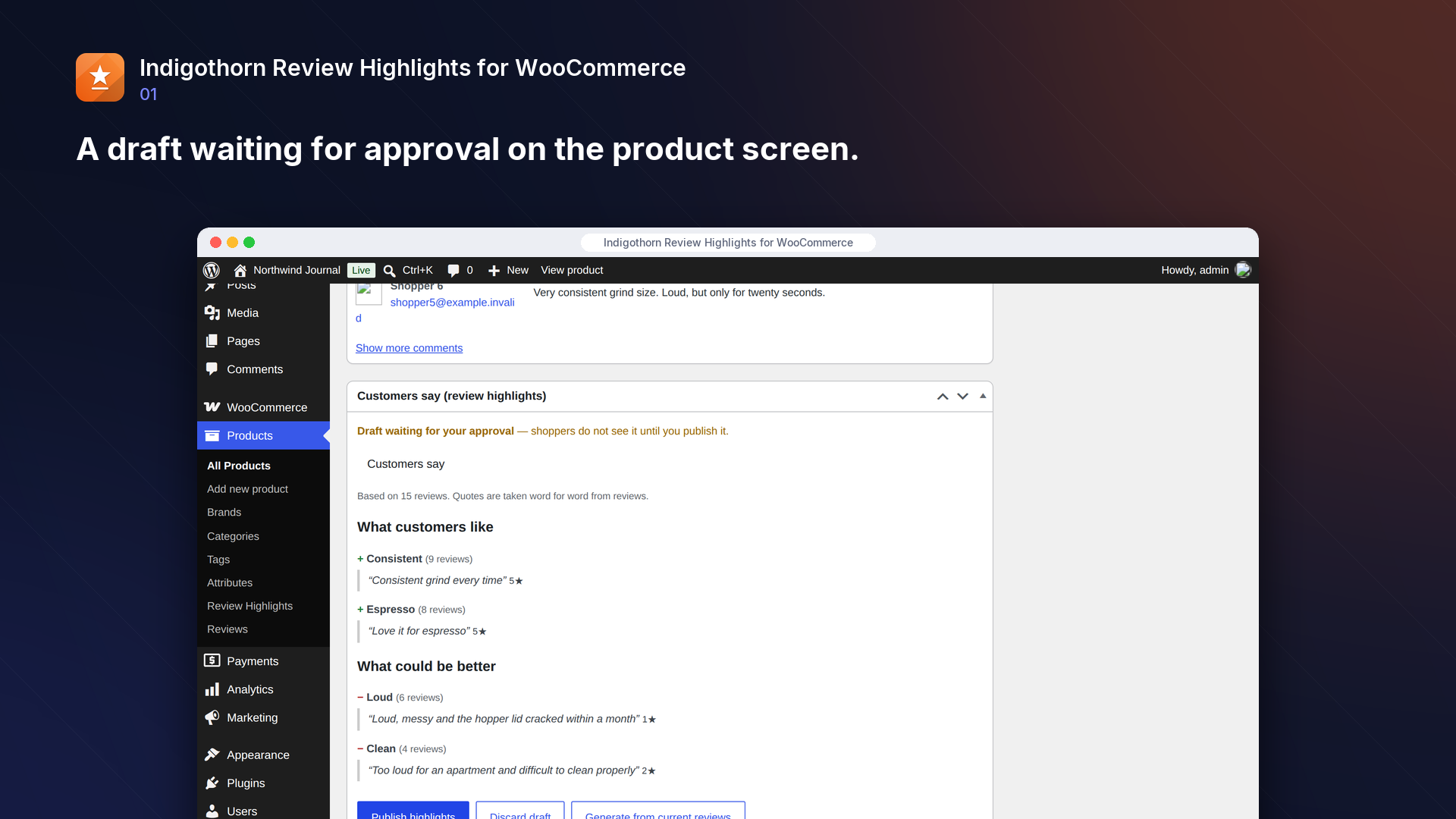
- You approve everything first. Highlights are created as a draft on the product screen; shoppers see them only after you click Publish. When new reviews arrive, a new draft is prepared and the published version stays until you approve the update.
- No made-up claims: a summary is never shown without at least two quotes that appear word for word in approved reviews.
- Works with standard WooCommerce reviews (including reviews collected by Customer Reviews for WooCommerce). Pending, spam and trashed reviews are ignored.
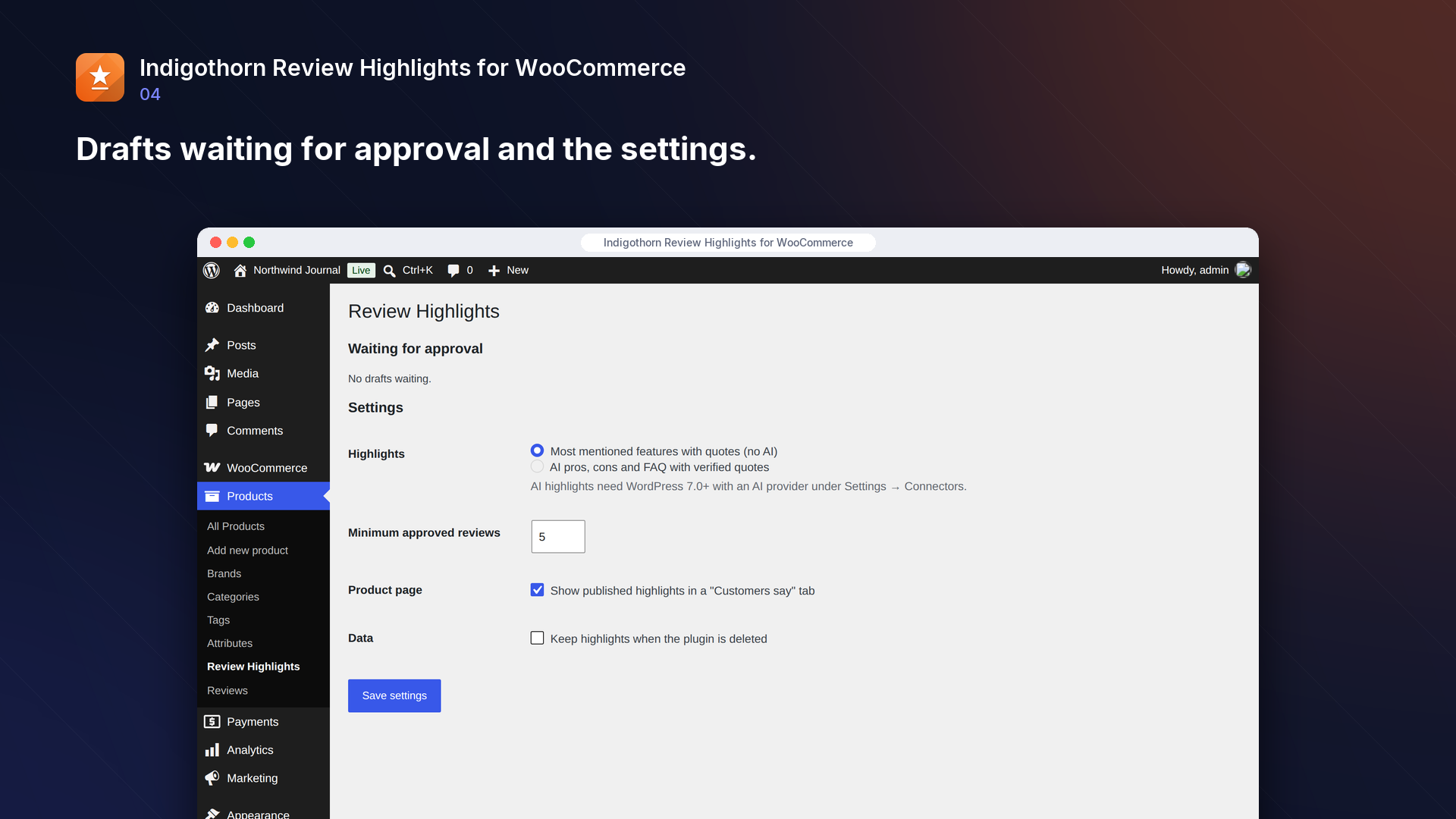
- Works without AI. Optionally, on WordPress 7.0+ with an AI provider set up under Settings → Connectors, AI can write pros, cons and a short FAQ; every AI quote is checked against the review it names and dropped if it is not there word for word.
- Shown in a "Customers say" product tab, with the "Customers say" block, or with the
[indigothorn_review_highlights]shortcode.
Light
Summarising 200 reviews without AI takes about 45 ms and happens in the background when reviews change; showing the published highlights on a product page costs about 1.5 ms.
Inside WordPress.
How we checked it.
Automated on every release in an offline lab. The numbers are copied from the latest runs.
automated tests: 35 unit and integration, 16 in a real browser
full regression on WordPress 7.1, 6.5 and multisite (2026-10-15)
Plugin Check errors and warnings, including experimental checks
issues found by independent code reviews and fixed, each with a regression test
automated WCAG 2.1 A/AA check of every screen, no serious issues
PHP versions in static analysis and coding standards, both clean
Performance10,003 published posts
- summarise 200 reviews (no AI): 43 ms, peak memory 124 MB, 5 quotes
- render published highlights on the product page: 1.5 ms, 6 queries
AI is your choice, and your provider.
How it works
Counts the features customers mention and picks real quotes for each. You publish.
AI
Optional: writes pros, cons and a short FAQ; every quote is checked against the review.
What leaves your site
Only with AI on: product name and approved review texts, no names or emails.
Common questions.
How many reviews does a product need?
Five approved reviews by default (adjustable).
Does it change or delete reviews?
No. Reviews are only read.
What happens when a quoted review is deleted or marked as spam?
Its quote disappears from the page right away. If fewer than two quotes are left, the whole section is hidden until a new draft is approved.
Which languages does it understand?
Highlights without AI work best for English, Polish and German reviews (each has its own word list, including negation). A feature mentioned in several of these languages counts as one highlight, labelled in your shop's language when reviews use it. Reviews in other languages still produce highlights from star ratings, with fewer of them.
Can shoppers see where a quote comes from?
Yes. Each quote has a "Read the full review" link to the original review. On the product page it opens the Reviews tab and jumps to that review. Reviews that are held for moderation, marked as spam or deleted are never linked.
Can I show the highlights somewhere else on the page?
Yes: use the "Customers say" block, or the [indigothorn_review_highlights] shortcode. On a product page it shows that product's highlights; elsewhere give the product ID, for example [indigothorn_review_highlights id="123"]. Only published highlights of published products are shown.
Who can approve highlights?
Anyone who can edit the product. Settings are for shop managers and administrators.
Can I approve many products at once?
Yes. Products → Indigothorn Review Highlights lists products with enough reviews. Select them, create drafts, then preview them on one screen and publish. Only the drafts you saw in the preview are published; if new reviews changed a draft in the meantime, that product is skipped and listed in the result.
Can it email me when drafts are waiting?
Yes, if you turn it on under Products → Indigothorn Review Highlights → Email. It is off by default. Your site sends at most one email an hour (through wp_mail), listing the products whose drafts changed because of new reviews. Enter up to 5 addresses separated by commas, or leave the field empty to use the site admin email. Drafts you create yourself never trigger an email.
What happens to my data when I delete the plugin?
Drafts, published highlights and settings are removed unless you tick "Keep highlights when the plugin is deleted". Reviews are never touched.
Installation
1. Install and activate the plugin (WooCommerce must be active).
2. Open a product with at least five reviews and click "Generate from current reviews" in the "Customers say" box.
3. Check the draft and click "Publish highlights". Products → Indigothorn Review Highlights lists drafts waiting for approval.