
 ContentWordPress plugin · Free
Indigothorn Table of Contents
A table of contents with zero JavaScript. Your LuckyWP links stay the same.
Switching TOC plugins breaks every shared #anchor link. This one doesn't.
Specification
- Price
- Free, GPL
- Version
- 0.1.0
- Requires
- WordPress 6.5+, PHP 8.1+
- Tested up to
- WordPress 7.1
- Instead of
- LuckyWP Table of Contents
- AI
- Not used
- Key number
- ~2 ms for a 120-heading post
See the idea work, right here.
A small working preview of what the plugin does, on sample data, in your browser. Nothing is sent anywhere.
Post content (edit me)
What visitors see · 0 kB JavaScript
Contents
- Getting started
#Getting_started- What you need
#What_you_need - Crème brûlée at the café
#Creme_brulee_at_the_cafe
- What you need
- Size & fit
#Size_fit- Getting started
#Getting_started1
- Getting started
- FAQ: returns?
#FAQ_returns
Same rules as the plugin: transliteration, duplicates get 1, 2…, skipped headings still use up their id. Collapsing uses native <details>, so it works without JavaScript.
Indigothorn Table of Contents vs the alternatives.
Measured in our lab with the same data where there is a number; features from each plugin’s own page otherwise.
| Feature | Indigothorn Table of ContentsIndigothorn · free | LuckyWP Table of Contents100k installs | Easy Table of Contents600k installs |
|---|---|---|---|
| Front-end JavaScript | 0 kB | 3.7 kB | Script + jQuery |
| Front-end CSS | 1.9 kB, only where shown | 3.0 kB | 9.2 kB |
| Collapses without JavaScript | Yes | No | No |
| Anchors identical to LuckyWP | Yes | — | No |
| Imports LuckyWP settings, shortcodes and blocks | Yes | — | No |
| Still updated | Yes | No | Yes |
Measured in our lab with the same posts. Anchors matched real LuckyWP output in 28 of 28 cases (three formats, duplicates, Polish and German characters). “—” means not applicable or not checked.
What you get.
What it does
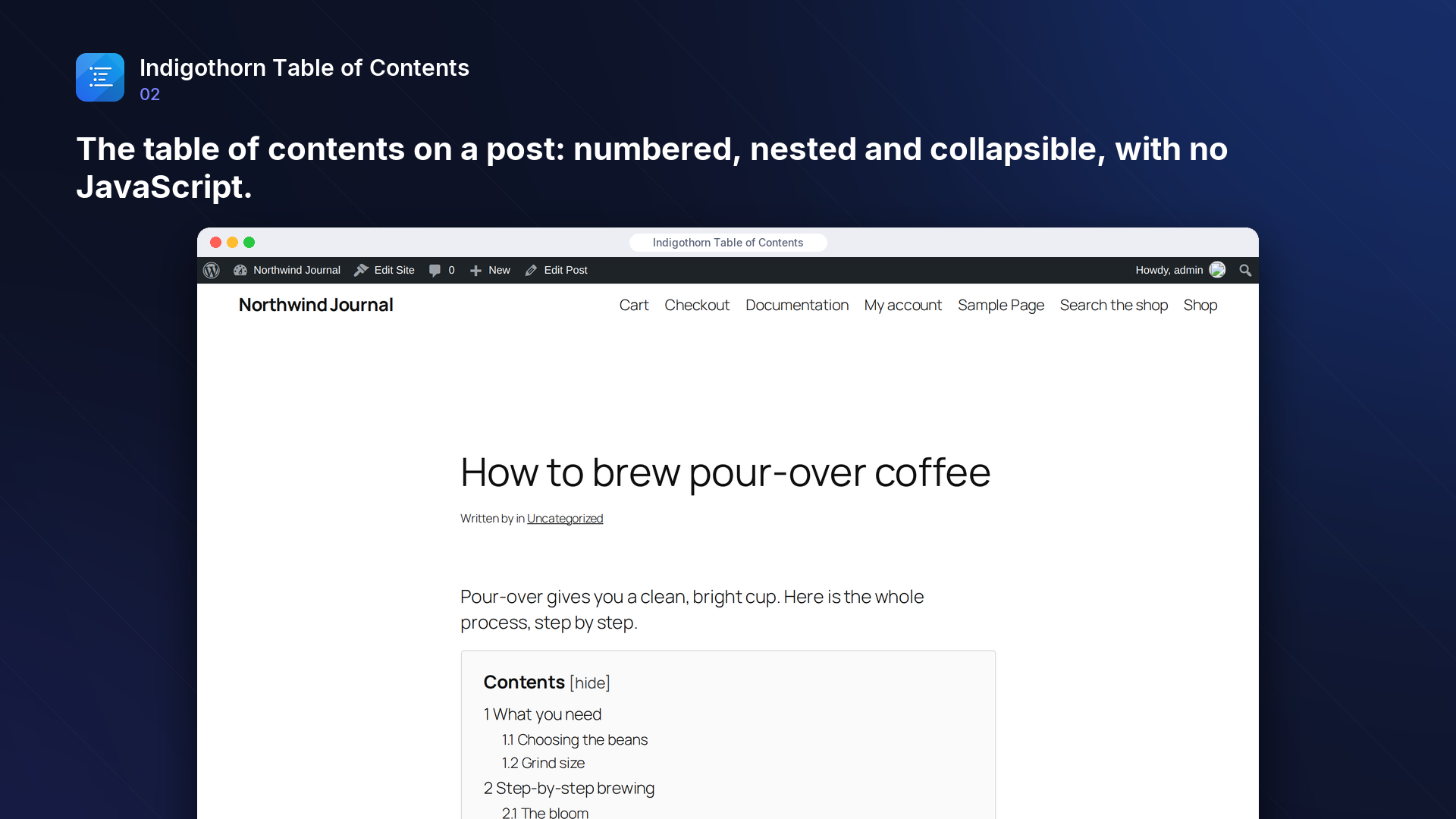
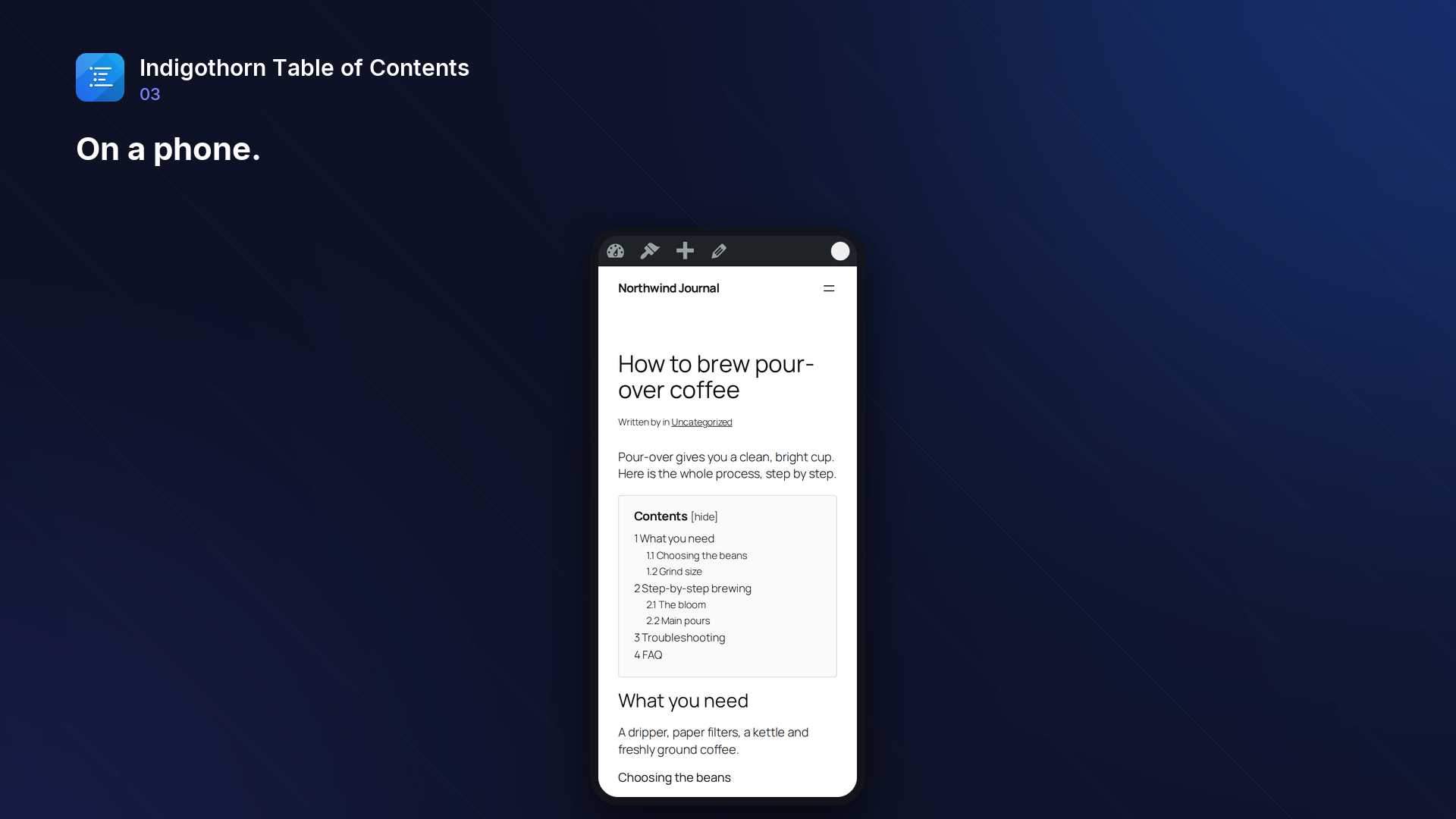
Indigothorn Table of Contents adds a clean, accessible table of contents to your posts: automatically, with a block, or with the [indigothorn_toc] shortcode. It loads no JavaScript on your pages; collapsing uses the native <details> element and numbering uses CSS.
Moving from LuckyWP Table of Contents? Links to your sections, like example.com/post/#Getting_started, are often shared on social media and indexed by search engines. Most table-of-contents plugins generate anchors differently, so those links break when you switch. This plugin generates the same anchors as LuckyWP, with the same formats and options, and:
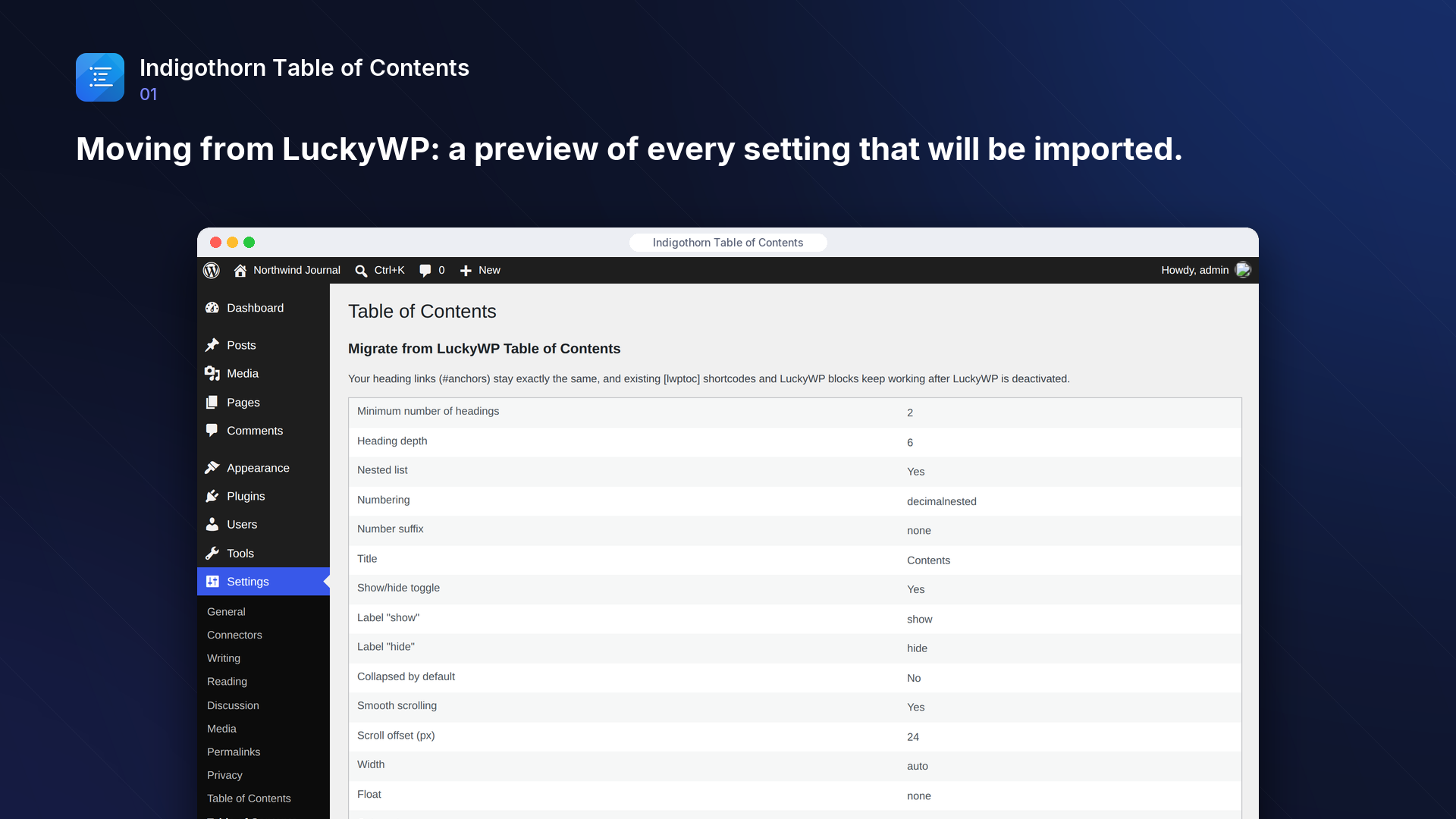
- imports your LuckyWP settings in one click (with a preview of what will be copied),
- keeps your
[lwptoc]shortcodes and LuckyWP blocks working after LuckyWP is deactivated (a migration alias, registered only while no other plugin uses that name), - respects LuckyWP's per-post settings (TOC disabled on a post, custom position or title).
Features
- Automatic insertion before or after the first heading, after the first block, at the top or at the bottom.
- Minimum number of headings, depth, hierarchical or flat list, decimal or roman numbering (nested or not).
- Skip heading levels or headings matching a pattern.
- Anchor formats: from the heading text (transliterated or keeping characters) or a counter; lowercase and dashes options.
- Collapsible, collapsed by default, smooth scrolling with an offset for sticky headers.
- Optional: a table of contents that stays visible while scrolling (CSS only) and a highlight of the section being read (a 2 kB script, off by default).
- Per-post settings in the block editor sidebar: show or hide the automatic table of contents, position, title, minimum headings, depth, numbering and collapsed state.
- No external services. Nothing leaves your site.
How it compares
Measured in a test lab with the same posts (October 2026):
- Front-end JavaScript: none by default; the optional current-section highlight adds 2 kB (LuckyWP: 3.7 kB script; Easy Table of Contents: script plus jQuery, js-cookie and sticky-kit).
- Front-end CSS: 1.9 kB, only on pages with a table of contents (LuckyWP 3.0 kB, Easy Table of Contents 9.2 kB).
- Collapsing: native
<details>, works without JavaScript. - Anchors: identical to LuckyWP in all 28 tested cases (three formats, options, duplicates, Polish and German characters).
- Speed: a 5,000-word post with 120 headings costs about 2 ms extra per page view and no database queries.
Inside WordPress.
How we checked it.
Automated on every release in an offline lab. The numbers are copied from the latest runs.
automated tests: 47 unit and integration, 16 in a real browser
full regression on WordPress 7.1, 6.5 and multisite (2026-10-15)
Plugin Check errors and warnings, including experimental checks
issues found by independent code reviews and fixed, each with a regression test
automated WCAG 2.1 A/AA check of every screen, no serious issues
PHP versions in static analysis and coding standards, both clean
No AI. Nothing leaves your site.
How it works
Reads your headings on the server. No JavaScript on the page.
AI
Not used. Everything runs on your server.
What leaves your site
Nothing. The plugin makes no outside requests.
Common questions.
Will my existing #anchor links keep working after I switch from LuckyWP?
Yes. Anchors are generated with the same rules as LuckyWP Table of Contents 2.1, including duplicate handling. Keep "Handle [lwptoc] shortcodes" enabled and import your settings.
Does it add JavaScript to my site?
No. The table of contents is plain HTML and a small stylesheet (under 3 kB), loaded only on pages that show a table of contents. The only script is the optional "Highlight the current section" (about 2 kB, no jQuery), loaded only when you switch it on and only on pages with a table of contents. "Stay visible while scrolling" is CSS only.
Can I place the table of contents myself?
Yes: use the "Table of Contents" block or the [indigothorn_toc] shortcode. Both accept the same options as the settings page (title, depth, numbering, toggle and more), for example [indigothorn_toc title="On this page" depth="3"].
Can I use the shorter [toc] shortcode?
Yes, as long as no other plugin or theme on your site uses [toc]: the plugin registers it as a short alias only when that name is free, so it never takes over another plugin's shortcode. [indigothorn_toc] always works.
Can I change the table of contents for one post only?
Yes. In the block editor, open the "Table of contents" panel in the post's sidebar. Every field starts at the site default; what you change applies to that post only and wins over the site settings and over LuckyWP's per-post settings. "Insert automatically: No" stops the automatic table of contents on that post; a block or shortcode you placed yourself still shows.
I customised LuckyWP with code (lwptoc_* hooks). What now?
Your existing [lwptoc] shortcodes keep working while "Handle [lwptoc] shortcodes" is on: [lwptoc] is a migration alias for old posts, registered only when LuckyWP (or another plugin) does not register it. For new posts use [indigothorn_toc] or the block. PHP code hooked into LuckyWP's own lwptoc_* filters has to be moved to the matching tocmig_* filters.
Does it work with block themes and page builders?
Yes. The table of contents is added when the content is rendered, so it works in classic and block themes. Headings added to the content by other plugins are included.
What happens to my data when I delete the plugin?
Settings, including per-post settings, are removed unless you tick "Keep settings when the plugin is deleted". Your posts are never changed: anchors are added when a page is displayed.
Installation
1. Install and activate the plugin.
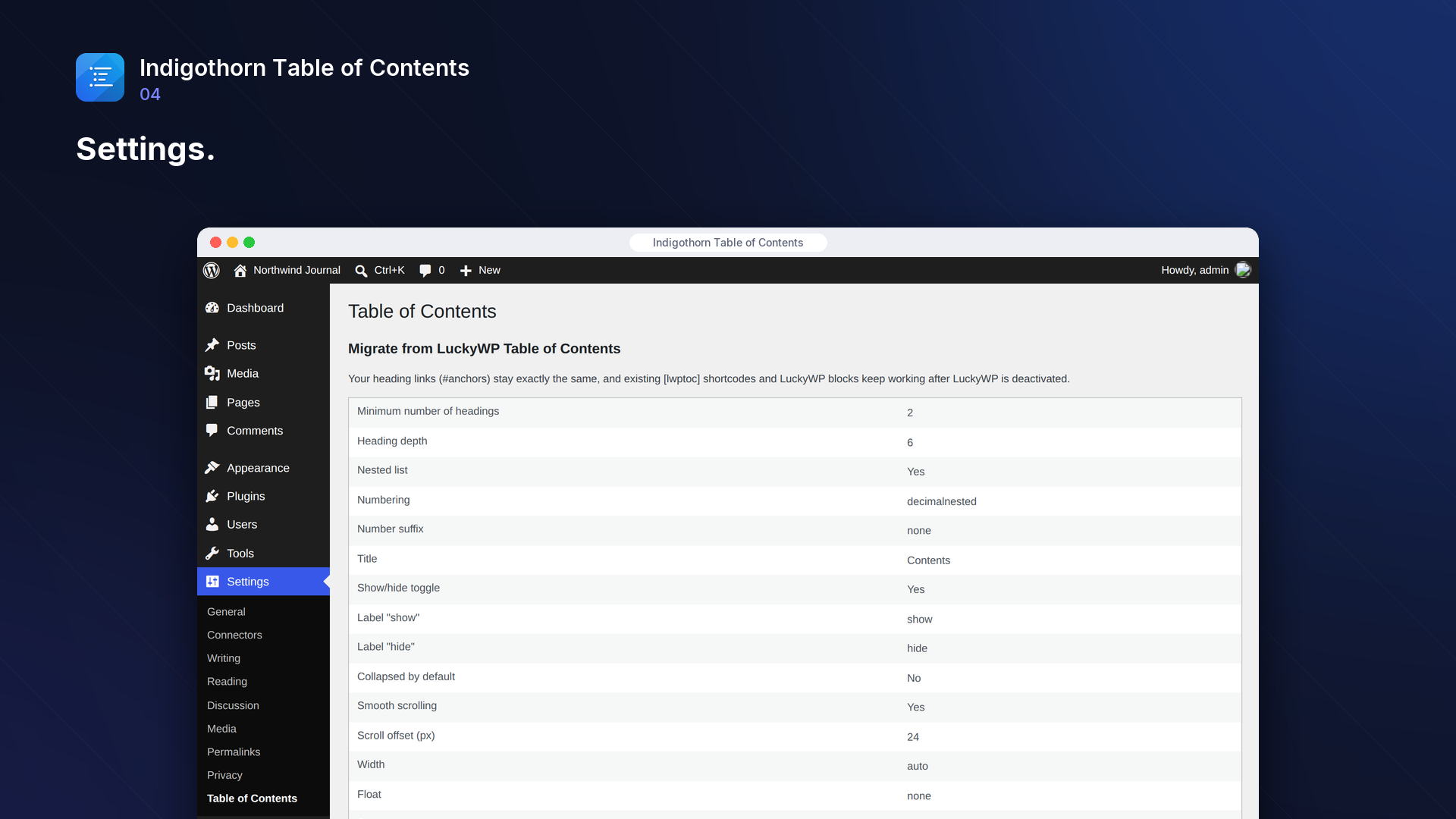
2. Go to Settings → Table of Contents.
3. Coming from LuckyWP? Check the preview under "Migrate from LuckyWP Table of Contents" and click "Import and deactivate LuckyWP". Otherwise switch on "Insert automatically" or add the "Table of Contents" block to a post.
Works well with.
Indigothorn Related Posts
Related posts that understand your content. YARPP migration in one click.
Indigothorn Link Checker
Find broken links without slowing your site. Fix them in one click.
Indigothorn Internal Links
Internal link suggestions from your own words, while you write. Free.